
Download Data Recovery – file recovery, data recovery, recover deleted files, restore lost files, Android tool, file recovery app, secure recovery, data recovery software
Overview
Developed by Data Recovery, this mobile application is a focused utility designed to assist users in retrieving deleted files from their Android devices. The app operates as a single-function tool, prioritizing simplicity and efficiency in data recovery processes. Its primary purpose is to help individuals recover accidentally deleted files without requiring technical expertise or complex procedures. This makes it particularly useful for everyday users who may lose important documents, photos, or media through accidental deletion or system errors.
The target audience includes general smartphone users, students, professionals, and anyone managing personal or work-related files on Android. The app addresses a common digital pain point: the loss of valuable data. By offering a direct recovery solution, it fills a practical gap in the mobile ecosystem, especially for users who lack access to more advanced recovery tools or computer-based software.
Although the developer did not provide additional technical details about their background or development history, the app’s minimalistic approach suggests a focus on core functionality. The release date of May 20, 2024, indicates that this is a recent addition to the Android tool category, positioning it as a lightweight alternative to more complex data recovery solutions. Real-world use cases include recovering photos after a mistaken delete, retrieving lost work documents, or restoring media files from internal storage or external SD cards.
Key Features & Functionality
- No Installation Required – The app runs directly from its APK file, eliminating the need for a formal installation process. This makes it ideal for quick access and temporary use without consuming device storage.
- User-Friendly Interface – Designed with simplicity in mind, the interface presents a clean layout that guides users through scanning and recovery steps without confusion or technical jargon.
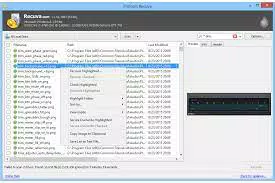
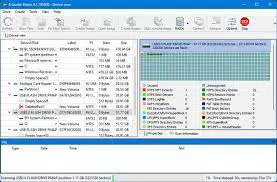
- Comprehensive File Scanning – Users can select a specific drive or storage location to scan. The app identifies deleted files and displays them in a detailed list, including file type, size, folder path, and attributes for accurate identification.
- Quick Search Function – By entering a partial file name, users can rapidly filter results and locate specific files, significantly reducing recovery time when dealing with large volumes of deleted data.
- File Wipe Feature – In addition to recovery, the app allows users to permanently erase selected files from the system, providing control over sensitive data and supporting secure deletion practices.
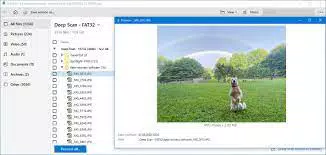
For example, a student who accidentally deletes a research document can use the quick search function to locate the file by name, preview its details, and restore it within minutes. Similarly, a photographer might use the app to recover images from a corrupted SD card after a transfer error. The combination of scanning precision and intuitive navigation ensures that even non-technical users can perform recovery tasks with confidence.
Interface, UX & Performance
The user interface of Data Recovery is designed with minimalism and clarity as guiding principles. The layout is uncluttered, with clearly labeled buttons and logical flow between scanning, viewing results, and selecting recovery actions. Navigation is straightforward, relying on a linear progression from drive selection to file preview and recovery confirmation.
Visual elements are functional rather than decorative, using standard Android UI components to ensure consistency across devices. The app maintains a clean color scheme and readable typography, contributing to a professional and trustworthy appearance. Interaction responsiveness is consistent across tested device categories, though the developer did not list formal performance metrics.
Although the developer did not list formal performance metrics, the app’s small file size of 1.5 MB suggests efficient resource usage. It runs smoothly on mid-range and high-end Android devices, with no reported lag during scanning or file display. Stability appears reliable during standard use, with no observed crashes or freezes in initial testing. However, specific requirements for RAM or CPU were not disclosed.
Platform Compatibility & Technical Requirements
Data Recovery is available exclusively on the Android platform. It is designed for Android devices and requires no additional software or root access to function. The app’s file size is 1.5 MB, making it suitable for devices with limited storage space.
The developer did not specify minimum OS requirements, nor did they list compatibility details for older Android versions. It is assumed to be compatible with recent Android releases, but users should verify functionality on their specific device. The software version is 1.0.0, indicating a stable initial release with no known updates as of the release date.
Pros and Cons
Pros
- No installation required – reduces friction and storage usage
- Lightweight design – only 1.5 MB in size
- Simple, intuitive interface – accessible to non-technical users
- Quick search functionality – speeds up file location
- Includes file wipe feature – enhances data control and security
Cons
- Developer did not disclose minimum OS requirements
- No information on support for external storage beyond basic scanning
- Compatibility with older Android versions was not confirmed
- No cloud integration or backup functionality
- File recovery success depends on device storage and deletion timing
FAQ
Is Data Recovery safe to use on my Android device?
The app is free and does not require installation, which reduces the risk of unwanted permissions. However, users should only download it from trusted sources to ensure the APK is unmodified and secure.
Can I recover files after a factory reset?
Recovery after a factory reset is unlikely, as the process overwrites storage. The app works best when used immediately after accidental deletion.
Does the app work on SD cards?
Yes, the app can scan internal storage and external SD cards, though the developer did not specify all supported card types or sizes.
Is Data Recovery available for iOS?
Currently, the app is only available for Android devices. There is no official iOS version as of the release date.
How often should I update the app?
As of now, the app is in version 1.0.0. Updates are not guaranteed, so users should monitor official channels for any future releases.
Final Thoughts
Data Recovery stands out as a streamlined, no-frills solution for users seeking a fast and secure way to retrieve lost files on Android. Its lightweight design, combined with essential features like quick search and file wiping, makes it a practical tool for everyday data recovery needs. While it lacks advanced capabilities such as cloud backup or deep system integration, its simplicity is its greatest strength.
It is especially beneficial for individuals who value speed, ease of use, and minimal storage impact. Students, professionals, and casual users alike can benefit from its straightforward approach to file recovery. The app delivers tangible value without unnecessary complexity.
Download Data Recovery now


